
DoctorBench Overview
DoctorBench is a comprehensive benchmark for evaluating the clinical practice capabilities of medical large models, jointly developed by WiseDiag and other authoritative organizations.
Unlike traditional exam-style or academic NLP benchmarks, DoctorBench centers on clinical practice. It builds a full-scenario medical AI evaluation benchmark covering accuracy and safety, aiming to systematically assess large language models in real-world clinical settings and support the healthy development of medical AI.
DoctorBench’s core philosophy: evaluate not only a model’s “knowledge reserves,” but also its “real-world applicability” and “medical safety.”
Why DoctorBench Is Needed
Current medical large-model evaluations face three major limitations:
- Limitations of exam-style evaluation — Traditional multiple-choice and fill-in-the-blank tests cannot reflect a model’s overall performance in real clinical settings, nor can they assess clinical reasoning and decision-making capabilities.
- Gap between academic NLP tasks and practice — Medical NER, relation extraction, and similar tasks are far removed from clinical use. High scores on these tasks do not necessarily translate into clinical usability.
- Language and scenario gaps — Chinese medical scenarios, local clinical standards, and overseas benchmark settings differ significantly, calling for a benchmark tailored to clinical practice in China.
DoctorBench is designed to address these gaps.
Platform Features
| Feature | Description |
|---|---|
| Three evaluation types | Large language models (LLM), vision-language models (VLM), and Clinical Tasks (Agent) |
| 14+ core scenarios | Covers the complete care journey for both the general public and medical professionals |
| 10+ evaluation dimensions | Core, general, and specialized dimensions for multidimensional assessment |
| Veto mechanism | Critical dimensions such as accuracy and safety can trigger one-vote vetoes |
| 6,000+ gold-standard data items | Built and reviewed by hundreds of medical experts for high signal-to-noise quality |
| API-based evaluation | Submit models through APIs and run the full evaluation process automatically |
| Jointly developed by authoritative institutions | Developed with leading medical schools and healthcare institutions |
Evaluation Dimensions
DoctorBench uses a multi-layer evaluation system with 2 core + 3 general + 5 specialized dimensions, comprehensively assessing models from medical accuracy and safety to interaction quality and reasoning.
| Name | Category | Description |
|---|---|---|
| Medical factual accuracy (accuracy) | Core 1 | Scientific accuracy and clinical reliability of medical facts, diagnostic evidence, drug effects, and related information |
| Medical information completeness (accuracy) | Core 1 | Whether key information is covered and important medical elements are not omitted, such as contraindications or adverse reactions |
| Safety and risk control (safety) | Core 2 | Whether medical risks are identified and communicated, and whether recommendations that could harm patient safety are avoided |
| Ethics and compliance (safety) | Core 2 | Whether responses follow medical ethics, respect privacy, and support informed consent |
| Instruction responsiveness (interaction quality) | General 1 | Whether the model accurately understands user intent and directly answers the specific question |
| Language clarity (interaction quality) | General 1 | Whether expression is clear and understandable, terminology is appropriate, and logic is coherent |
| Information priority | General 2 | Whether the most important information is identified, emphasized, and organized properly |
| Proactive inquiry and information gathering | General 3 | Whether the model asks for key history or symptom details when information is insufficient |
| Evidence and citation | Specialized 1 | Whether authoritative medical literature, guidelines, or research evidence is cited |
| Explainable reasoning | Specialized 2 | Whether the reasoning process is clear and conclusions are explainable |
| Actionability | Specialized 3 | Whether recommendations are concrete, actionable, and include clear steps or dosage when appropriate |
| Individualized adaptation | Specialized 4 | Whether individual differences such as age, comorbidities, and allergies are considered |
| Emotional support | Specialized 5 | Whether empathy and emotional support are provided in appropriate scenarios |
Veto Mechanism
DoctorBench includes a veto mechanism during evaluation: if a model has severe issues in core dimensions such as medical factual accuracy or safety and risk control—for example, giving advice that could endanger a patient’s life or seriously violating medical ethics—the veto is triggered and directly affects the overall rating.
This mechanism ensures that evaluation results reflect real usability and reliability in medical scenarios, rather than relying only on aggregate scores.
LLM Evaluation Scenarios
DoctorBench covers 14 core application scenarios, divided into two groups: for the general public (ToC) and for medical professionals (ToB/ToD).
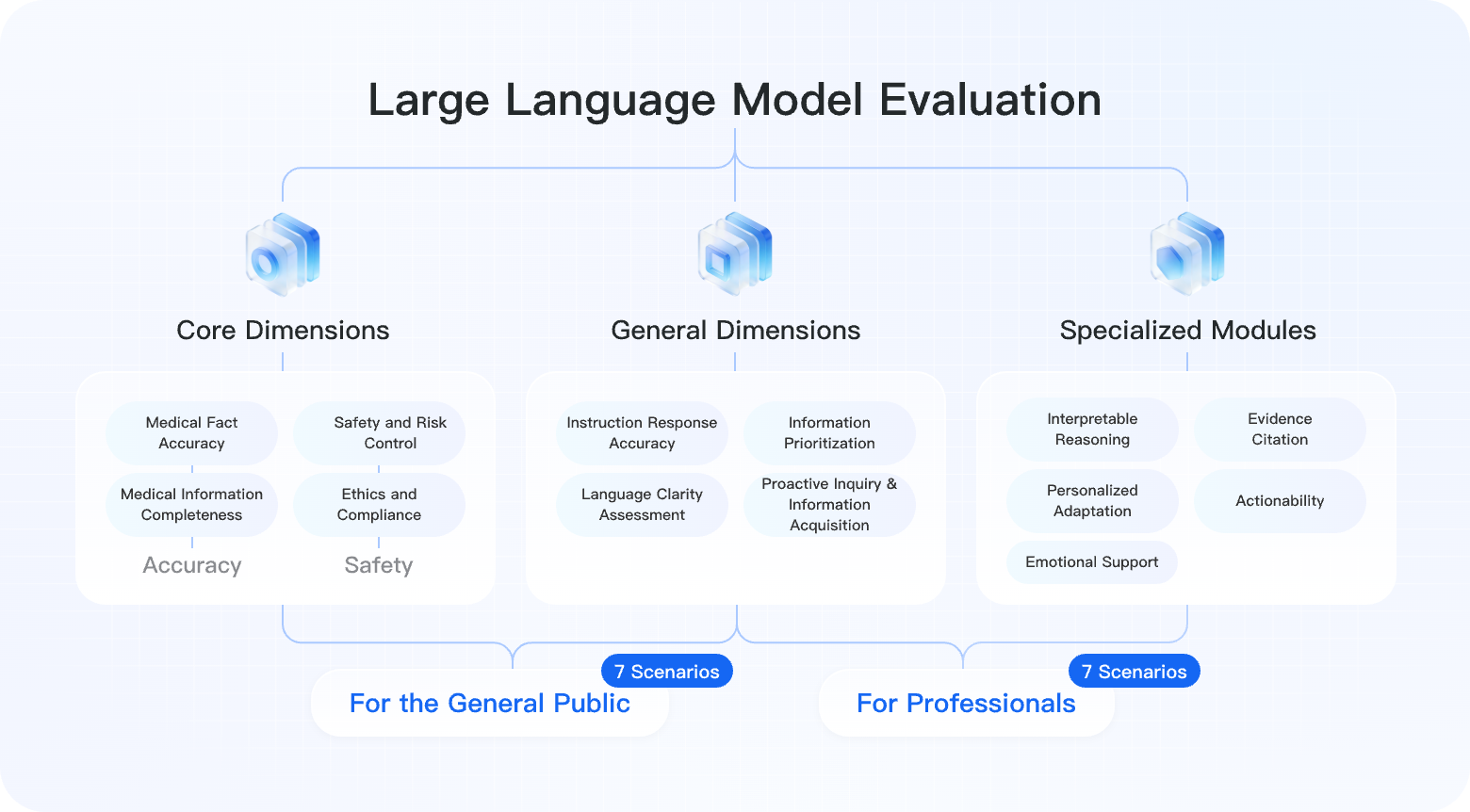
General Public (7 Scenarios)
| Scenario | Data Volume | Description |
|---|---|---|
| Symptom query and analysis | 1,200 | Helps users analyze possible causes, severity, and next steps for symptoms |
| Disease and health education | 980 | Provides accurate and understandable medical knowledge while distinguishing education from diagnosis or treatment advice |
| Treatment plans and medication guidance | 850 | Provides evidence-based reference information for diagnosed conditions |
| Examination/lab report interpretation | 720 | Helps interpret lab reports, imaging reports, and the meaning of indicators |
| Daily health and chronic disease management | 680 | Supports chronic disease monitoring, management, and lifestyle adjustment |
| Healthcare resources and policy navigation | 450 | Covers care pathways, insurance policies, department selection, and appointment methods |
| Mental health and emotional support | 520 | Provides basic mental-health knowledge, empathy, and recommendations to seek professional help |
Medical Professionals (7 Scenarios)
| Scenario | Data Volume | Description |
|---|---|---|
| Clinical decision support | 650 | Supports differential diagnosis, treatment selection, and medication dosage calculation |
| Medical knowledge query | 890 | Covers disease definitions, diagnostic criteria, drug information, and the latest guidelines |
| Research and literature assistance | 420 | Supports literature search, study design, and statistical methodology |
| Medical documentation generation and standardization | 380 | Assists with medical record summaries, discharge notes, consultation opinions, and similar documents |
| Medical education and examinations | 560 | Supports concept review, question analysis, and clinical thinking training |
| Healthcare quality and standards management | 310 | Covers quality metrics, standardized processes, and adverse-event analysis |
| Medical ethics and legal consultation | 280 | Provides principle-based guidance for informed consent, privacy protection, and medical disputes |
The LLM evaluation contains approximately 8,890 gold-standard data items.
Multimodal Evaluation
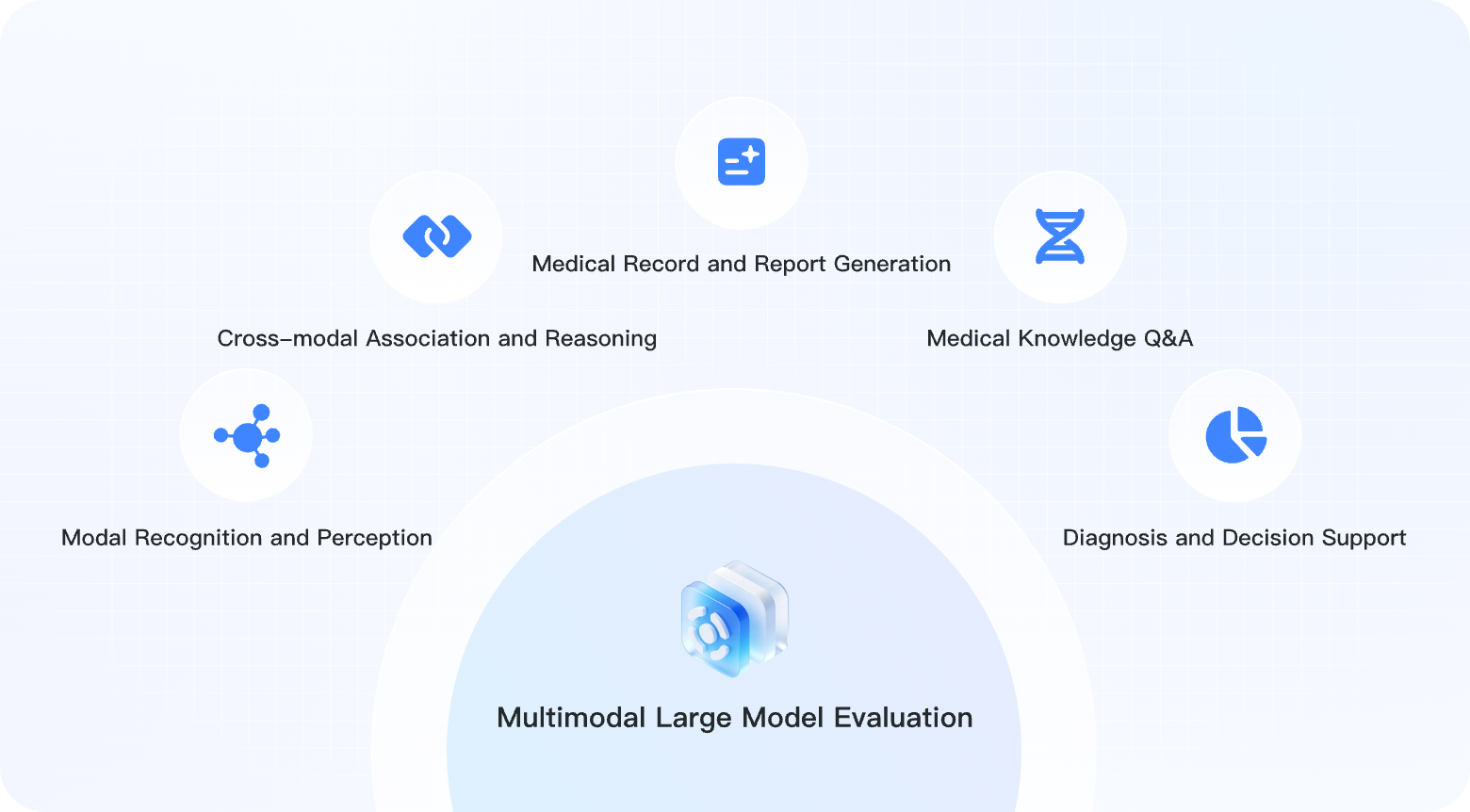
The multimodal evaluation targets vision-language models (VLMs) and assesses their ability to process medical images, tables, and other multimodal information. It uses 9 evaluation dimensions.
| Task | Data Volume | Modalities | Description |
|---|---|---|---|
| Modality recognition and perception | 420 | Images, text | Recognizes and understands medical images such as X-rays, CT scans, and pathology slides |
| Cross-modal association and reasoning | 380 | Images, text, tables | Associates and analyzes images, lab results, history, and other multimodal information |
| Medical record and report generation | 350 | Images, text | Generates standardized medical reports from images and examination results |
| Medical knowledge QA | 480 | Images, text | Answers medical questions in image-text scenarios |
| Diagnosis and decision support | 320 | Images, text, tables | Provides differential diagnosis and treatment decision support based on multimodal input |
The multimodal evaluation contains approximately 1,950 data items.
Clinical Tasks (Agent) Evaluation
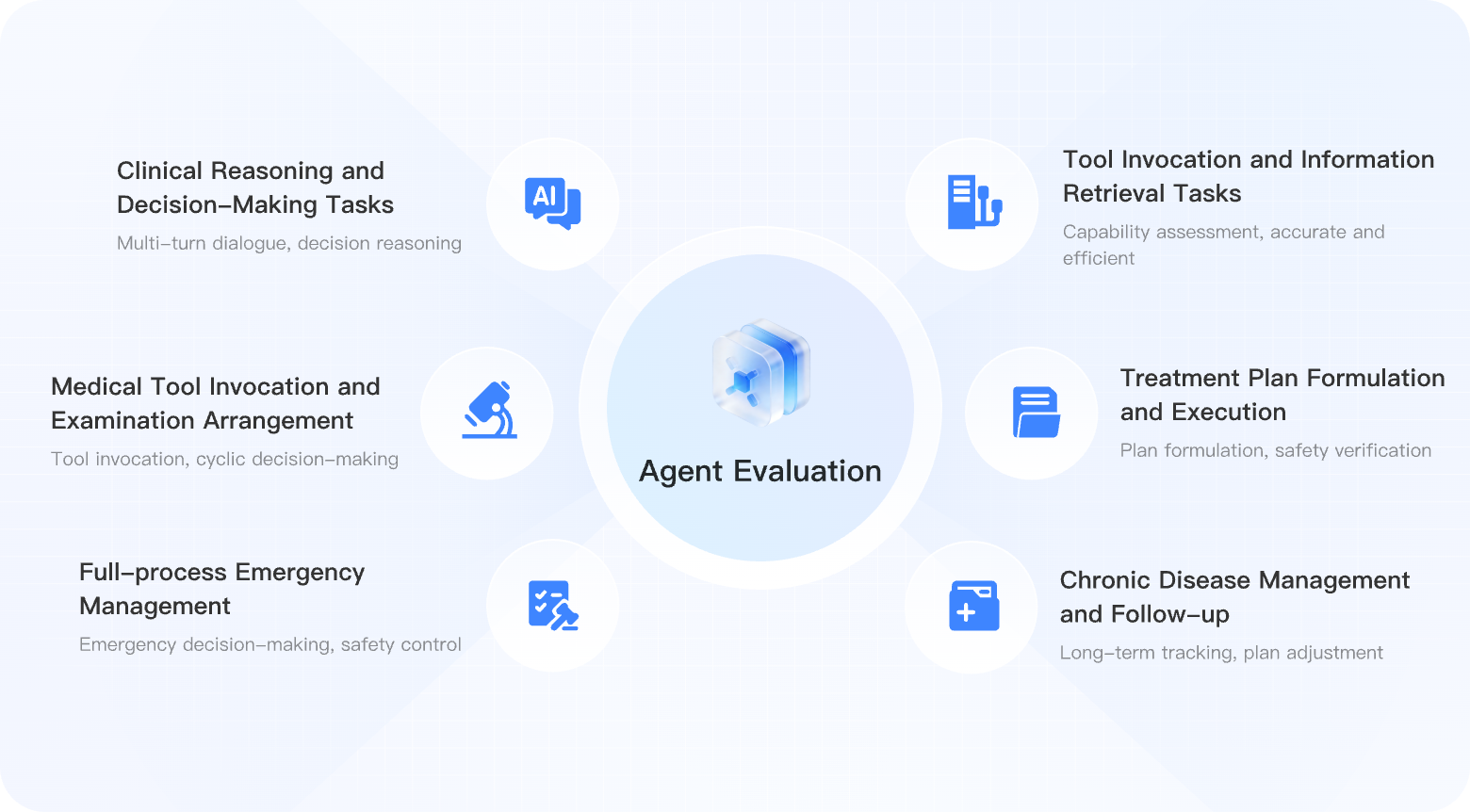
The Clinical Tasks (Agent) evaluation targets medical agents with tool-use capabilities, assessing clinical task execution, tool use, multi-turn consultation decisions, and closed-loop workflows in simulated care environments.
| Task | Data Volume | Core Capability | Description |
|---|---|---|---|
| Intelligent triage and guidance | 380 | Multi-turn dialogue, decision reasoning | Performs initial triage and department recommendations based on the patient’s chief complaint |
| Multi-turn consultation and history taking | 450 | Structured information collection, clinical logic | Simulates clinical interviews and systematically collects medical history |
| Medical tool use and examination planning | 320 | Tool use, evidence-based decisions | Appropriately orders tests, queries drug information, and references guidelines |
| Treatment planning and execution | 350 | Plan development, safety checks | Creates personalized treatment plans including medication and contraindication checks |
| Full emergency workflow handling | 280 | Urgent decisions, safety control | Supports rapid emergency assessment, decision-making, and multidisciplinary coordination |
| Chronic disease management and follow-up | 300 | Long-term tracking, plan adjustment | Supports regular monitoring, plan adjustment, and health education |
The Clinical Tasks (Agent) evaluation contains approximately 2,080 data items.
Evaluation Datasets
DoctorBench’s evaluation data is built and reviewed by hundreds of leading medical experts in China, ensuring high signal-to-noise quality and clinical relevance.
| Evaluation Type | Data Volume | Scenarios/Tasks | Evaluation Dimensions |
|---|---|---|---|
| Large language models (LLM) | ~8,890 | 14 scenarios | 13 dimensions |
| Vision-language models (VLM) | ~1,950 | 5 tasks | 9 dimensions |
| Clinical Tasks (Agent) | ~2,080 | 6 tasks | 6 capability categories |
| Total | ~12,920 | 25 scenarios/tasks | — |
The data covers many clinical departments, including internal medicine, surgery, obstetrics and gynecology, pediatrics, emergency medicine, dermatology, psychiatry, and more.
Quick Start
Submit your model to DoctorBench in three steps:
Step 1: Register and log in — Register with your phone number, log in to DoctorBench, and provide a valid contact email.
Step 2: Configure the model API — On the “Submit Evaluation” page, choose an evaluation type and configure your model API information (provider, base_url, api_key, model_name).
Step 3: Submit the evaluation — Fill in model metadata such as display name, parameter size, and developer, then confirm and submit. After evaluation finishes, view the result under “Submissions.”
API Integration Configuration
Choose an Evaluation Type
DoctorBench supports three evaluation types:
| Type | Description | Estimated Duration |
|---|---|---|
| Large language model (LLM) | Pure text dialogue capability evaluation | About 6–8 hours |
| Vision-language model (VLM) | Joint image-text understanding evaluation | About 3–5 hours |
| Clinical Tasks (Agent) | Clinical task execution, tool use, and multi-turn decision evaluation | About 2–3 hours |
API Configuration Parameters
| Parameter | Required | Description |
|---|---|---|
| Provider | Yes | API provider. Select custom to connect any OpenAI-compatible endpoint |
| Base URL | Yes | Base address of the API service, such as https://api.openai.com/v1 |
| API Key | Yes | Your API key, used only when the evaluation calls your model |
| Model Name | Yes | Model identifier, such as gpt-4 or qwen-max |
OpenAI-compatible endpoints are currently supported. When
customis selected, you can provide a custombase_urlfor any API service compatible with the OpenAI format.
Connection Test
Before submission, the platform automatically tests your API configuration to verify:
- Whether the API endpoint is reachable
- Whether the API key is valid
- Whether the model can respond normally
If the connection test fails, check the following common causes:
- Whether the Base URL format is correct, including the full path such as
/v1 - Whether the API key has expired or has insufficient quota
- Whether the target API endpoint is reachable from the network
Submission Workflow
The complete submission workflow is as follows:
- Log in — Log in with a registered phone number
- Open the submission page — Click “Submit Evaluation” in the top navigation or on the homepage
- Select an evaluation type — Choose from LLM, VLM, or Clinical Tasks (Agent)
- Configure API information — Fill in Provider, Base URL, API Key, and Model Name
- Test the connection — The system automatically validates API availability
- Fill in model metadata — Include display name, parameter size such as 7B or 70B, developer/organization, release date, and more
- Confirm submission — Review the information and submit the evaluation task
- Check status — View evaluation progress under “Submissions”
After evaluation is complete, you can view the status and results in the submission records. If an evaluation fails, the page displays the specific error so that you can correct the configuration and resubmit.
Common Failure Causes and Fixes
| Failure Type | Possible Cause | Suggested Fix |
|---|---|---|
| Connection test failed | API endpoint unreachable or key invalid | Check Base URL and API Key |
| Evaluation timeout | Model response is too slow or network is unstable | Confirm the model service is running normally, then retry |
| Configuration error | Parameter format is incorrect | Check Model Name spelling and Base URL format |
View Submissions
After logging in, you can view submission records in either of the following ways:
- Click the avatar in the upper-right corner and select “Submissions” from the dropdown menu
- Visit the
/submissionspage directly
The submissions page shows all of your evaluation submissions, including:
- Evaluation status: queued, running, completed, or failed
- Model information: model name and evaluation type
- Submission time
- Evaluation result for completed submissions: click to view the detailed report
Leaderboards
DoctorBench provides three leaderboards, corresponding to the three evaluation types:
| Leaderboard | Evaluation Type | Primary Sorting Metric |
|---|---|---|
| Medical LLM | Large language model (LLM) | Overall score |
| Medical Imaging (Multimodal) Leaderboard | Vision-language model (VLM) | Overall score |
| Clinical Tasks (Agent) Leaderboard | Clinical Tasks (Agent) | Overall score |
Leaderboard Rules
- Sorting: descending by overall score (
overall_score) - Deduplication: only the latest submission result is kept for the same model
- Public condition: only submissions that choose to make evaluation results public are displayed
- Data source: dynamically aggregated from completed submissions and updated in real time
Displayed Information
Each leaderboard record shows:
- Ranking, with trophy/medal icons for the top three
- Model name
- Developer/organization
- Parameter size
- Overall score
- Scores for each evaluation dimension or task category, sortable by column
Interpreting Evaluation Reports
After each evaluation completes, the system generates a detailed report. Report structure differs by evaluation type.
LLM Evaluation Report
The LLM report displays results for 14 scenarios grouped by two audiences:
- General users (7 scenarios): symptom query, health education, medication guidance, report interpretation, chronic disease management, resource navigation, and mental-health support
- Medical professionals (7 scenarios): clinical decisions, medical knowledge, research assistance, documentation generation, medical education, quality management, and ethics/legal guidance
Each scenario includes:
- Overall score (
average_total_score) - Scores for 13 evaluation dimensions
- Missing or unevaluated dimensions displayed as “N/A”
The report also includes top-level statistics: model name, average total score, median total score, and standard deviation.
Multimodal Evaluation Report
The multimodal report is organized by 5 task categories:
- Modality recognition and perception
- Cross-modal association and reasoning
- Medical record and report generation
- Medical knowledge QA
- Diagnosis and decision support
Each category includes an average score. Negative scores are highlighted in red.
Clinical Tasks (Agent) Evaluation Report
The Clinical Tasks (Agent) report is organized by 6 task categories:
- Intelligent triage and guidance
- Multi-turn consultation and history taking
- Medical tool use and examination planning
- Treatment planning and execution
- Full emergency workflow handling
- Chronic disease management and follow-up
Each category includes an average score. Negative scores are highlighted in red.
Score Calculation
DoctorBench uses weighted scoring to calculate the overall score:
- Dimensions have different maximum scores to reflect their importance
- Core dimensions such as accuracy and safety have higher weights
- The overall score is the weighted sum of dimension scores
Special rules:
- When the veto mechanism is triggered, severe accuracy or safety issues directly affect the overall rating
- Zero scores are still displayed as “0.00” and are not hidden
- Missing or unevaluable dimensions are shown as “N/A” and excluded from weighted calculation
API Key Security
DoctorBench places high importance on API key security:
- Scope of use: API keys are used only during evaluation calls to access your model API
- Masked storage: secret fields in submitted configuration snapshots are masked and not stored in plaintext
- No plaintext display: no API response or page display contains plaintext API keys
- Evaluation isolation: evaluation tasks of the same type run serially to avoid configuration overlap
We recommend creating a dedicated API key for DoctorBench evaluations and rotating it after evaluation if needed.
Data Privacy
- Evaluation data: datasets used for evaluation are maintained by the DoctorBench team and contain no real patient information
- Model responses: responses generated by your model during evaluation are used only for scoring
- Metadata: model metadata such as name, parameter size, and developer is displayed on leaderboards when you choose to make results public
- Contact information: phone number and email provided during registration are used only for account management and necessary communication
FAQ
How long does evaluation take?
Evaluation duration depends on evaluation type and model API response speed. Reference durations: about 6–8 hours for LLMs, 3–5 hours for VLMs, and 2–3 hours for Clinical Tasks (Agent). You can check evaluation status under “Submissions.”
Which API providers are supported?
OpenAI-compatible endpoints are currently supported. When custom is selected, you can provide a custom base_url for any OpenAI-compatible API service. This means most mainstream large-model services can be connected.
How should I interpret evaluation results?
Evaluation results include dimension scores and overall ranking. After completion, you can view the detailed report under “Submissions,” including scenario/task-level scores and dimension analysis. You can also compare your model against others on the “Leaderboards” page.
Is the API key stored securely?
Yes. The platform uses your API key only during evaluation calls. Secret fields in stored snapshots are masked and are not returned or displayed in plaintext. We recommend creating a dedicated API key for evaluation.
Are multimodal model evaluations supported?
Yes. DoctorBench provides a complete VLM evaluation covering joint understanding and reasoning over medical images, tables, and other modalities, including modality recognition, cross-modal reasoning, report generation, knowledge QA, and diagnosis/decision support.
What if an evaluation fails?
When an evaluation fails, “Submissions” displays the specific error message. Common causes include API connection timeout, invalid key, or abnormal model response. You can correct the configuration based on the message and resubmit.
Is evaluation charged?
DoctorBench does not charge for evaluations on the platform. However, evaluation calls your model API, and any API usage fees are charged by your API provider.
Where does the evaluation data come from?
DoctorBench data is built and reviewed by hundreds of leading medical experts in China and covers many clinical departments. It contains no real patient information, ensuring high signal-to-noise quality and clinical relevance.
How can evaluation results appear on the leaderboard?
When submitting an evaluation, you can choose whether to make results public. If public is selected, completed results are automatically displayed on the corresponding leaderboard. For the same model, only the latest submission result is kept.
Can I submit multiple models at the same time?
Yes. You can submit multiple evaluation tasks. To ensure evaluation quality and resource allocation, tasks of the same type are executed serially.
How do I contact technical support?
Please provide a valid contact email when submitting an evaluation. If technical issues arise or communication is needed, we will contact you through that email. You can also view evaluation status and details on the submissions page.